Tuesday, December 1, 2015

Resources shared in the webinar: Dig Deeper into Earth Science with Making North America

This blog post is simply a compilation of links to resources discussed in the December 1, 2015 NOVA Education webinar Dig Deeper into Earth Science with Making North America. The brevity of the webinar assures that not all of the listed links will be visited. A recording of the webinar will be available on the site (the preceding link) shortly after the webinar.

Webinar Description:

Tue, Dec 1, 7:00 PM - 8:00 PM
Hangouts On Air - Broadcast for free

Join us for a discussion about new classroom resources from NOVA’s Making North America — a 3-part series that tells the 3-billion year story of our continent’s geological formation and evolution.  Special guests Rob Ross and Don Duggan-Haas of the Paleontological Research Institution (PRI) will discuss strategies on how to connect the content of Making North America to local and regional Earth science.

On December 1st at 7PM EST / 4PM PST, we’ll look at a range of free resources, including PRI’s Teacher-Friendly Guides to the Earth Science of the United States, which provide a blueprint for engaging grades 6-12 students in actual Earth science fieldwork within their geographic region. 

The Links:


Bios:

Don Duggan-Haas is the Director of Teacher Programs at PRI and its Museum of the Earth & Cayuga Nature Center in Ithaca, NY. Don’s work in teacher education, teacher professional development and curriculum materials development marries deep understandings of how people learn with deep understandings of the Earth system. He is a nationally regarded expert in place-based and technology-rich Earth and environmental science education, especially as related to the use of Virtual Fieldwork Experiences (VFEs). VFEs are multi-media representations of actual field sites ideally created by teachers and students working together. He also has expertise in climate and energy education and is co-author of the book, The Science Beneath the Surface: A Very Short Guide to the Marcellus Shale. He served on the Earth & Space Science Design Team for the National Research Council’s A Framework for K-12 Science Education: Practices, Crosscutting Concepts, and Core Ideas and currently serves as the Second Vice President of the National Association of Geoscience Teachers. Don has taught at Colgate, Cornell, and Michigan State Universities, Kalamazoo College, and Tapestry and Norwich (New York) High Schools.

Rob Ross is Associate Director for Outreach at the Paleontological Research Institution (PRI) in Ithaca, NY. He was trained as a paleontologist (PhD from Harvard in 1990) and paleoceanographer (post-doc at the University of Kiel in Germany), and for four years was on the faculty at Shizuoka University in Japan. He moved to Ithaca to work at PRI in 1997 and facilitated the expansion of PRI programming for local school and community groups, helped found teacher professional development programs focused on place-based learning and authentic science experiences, and participated in various national initiatives to improve Earth science education nationally. Rob was part of the team that opened PRI's Museum of the Earth in 2003 and worked on merger with the Cayuga Nature Center that was finalized in 2013. He is founder of the Teacher-Friendly Guide series and co-author and co-editor of a number of books and papers in paleontology and Earth science education. He also teaches courses at Ithaca College and Cornell University.

Tuesday, February 3, 2015

Tools for Making Virtual Fieldwork: Resources from the ReaL Earth Inquiry Project

As the Regional and Local (ReaL) Earth Inquiry Project has progressed, the tools and strategies for making and using Virtual Fieldwork Experiences (VFEs) have evolved. If you scroll back through this blog, you'll see periodic updates on how how to use and make VFEs. The project is now in its final months, but our VFE work will continue beyond the end of this particular project's funding.

VFEs are now being used in educational outreach for the Critical Zone Observatory Network and this work will add to the set of VFEs in our database, as well as to the set of tools and strategies for making and using VFEs.

This blog entry points to resources that have come online in the last few months, most importantly including the new regional Teacher Friendly Guides to Earth Science for Midwestern and Western US. Other regions will follow shortly, and older Northeastern and Southeastern Guides will be updated. The new guides all include or will include a chapter on actual and virtual fieldwork, and after this blog, is the next thing you should read as you begin your work with VFEs.

Most of the rest of the text of this post is a conference abstract from the October 2014 Geological Society of America meeting from a talk that shares the same title as this post. The abstract is followed by the Prezi used in that presentation and then by a set of related links. Most of these links are also embedded within the Prezi. Note that if you are viewing the Prezi in full-screen mode, the links will open in a new window that won't be visible until you exit full-screen viewing.

Abstract:

Why does a place look the way it does? How can we teach the reading of landscapes? Through two NSF-funded programs, “The Regional and Local (ReaL) Earth Inquiry Project” and “Improving Earth science education through teacher development in regional geology,” the Paleontological Research Institution has developed a rich set of resources and approaches to help educators teach about local geoscience in technology-rich, scientifically accurate and inquiry-based ways. The three-pronged approach: (1) develops a series of seven regional Teacher-Friendly Guides to Geoscience that collectively cover the entire United States; (2) develops, with our educator-partners, Virtual Fieldwork Experiences (VFEs) that are multi-media representations of actual field sites; and; (3) provides professional development (PD) programming that intertwines (1) and (2).

VFEs can serve in the place of actual fieldwork, but it is hoped that they serve more to catalyze and extend fieldwork than replace it. As framed in PRI’s work, VFE development requires actual fieldwork, and the VFE is a way to document that work and share it with others.

Resources include: (1) a set of regional Teacher-Friendly Guides; (2) a carefully crafted set of Bigger Ideas and Overarching Questions in Earth System Science, mapped onto idea sets like those in NGSS and the Climate Literacy Principles; (3) sets of questions that can be asked and productively investigated at any site, one set focused primarily upon the geosciences and a second focused upon ecology; (4) templates for Prezi and PowerPoint that help educators connect the question sets with local imagery and other data; (5) resources for connecting the field and the classroom via videolink in real time, and for connecting classrooms to one another, to facilitate students teaching one another about their local environments; (6) a still growing set of VFEs; and (7) tutorials for using Google Earth, Prezi, and other technologies in the service of making VFEs. Topics include using Google Earth to replicate the classic science education film Powers of Ten, but focused upon a local landmark rather than a Chicago park; how to use the VFE templates; how to mash up USGS digital geologic state maps with Google Earth’s profile tool, to show the interplay between bedrock geology and topography; and more. 

Session Prezi:


Selected Links:

    • https://evernote.com/skitch/ - Skitch is an app that allows you to mark up photos and maps in the field using your tablet or smartphone. 
    • http://gigapan.com - Gigapan is a robotic tripod head and software package for making gigapixel resolution panoramas. 

Wednesday, June 18, 2014

What should we think about when we plan the order of units in a course?

Is there one best order of course topics? No. But some approaches are better than others. What should you consider when you outline your course?

Where this post came from

This post is a revised version of a contribution I made to a discussion on the ESPRIT List (a list serve for Earth science teachers). I highly recommend the list for middle and high school Earth science teachers - it's an engaging and friendly community. It also generates a lot of email, so I suggest setting up a filter in your email so it doesn't overwhelm your email in box. I don't read every message, but look for subject lines of interest and people I know who have interesting things to say. 

The list is also archived, but access to the archives is password protected. If you're on the list, you can see the full discussion thread here (it's long, and gets a little too philosophical for even my tastes when you get into it). 

What should you consider when you outline your course?

In the discussion on the ESPRIT list, a few folks noted that two things are key 
  • context (and systems), and, 
  • having a thoughtful rationale for your sequence. If you've thought through an argument for why you've chosen what you've chosen, it will probably work reasonably well, though getting input from the greater wisdom on the list will likely make it better. 

Last time I taught the high school Earth science, I didn't think through the sequence well enough, and regretted it throughout the year. As mapping (a form of modeling) is central to nearly everything within the curriculum, it makes good sense to pay good attention to mapping and it's cross-cutting nature from the outset. I didn't. Oops. 

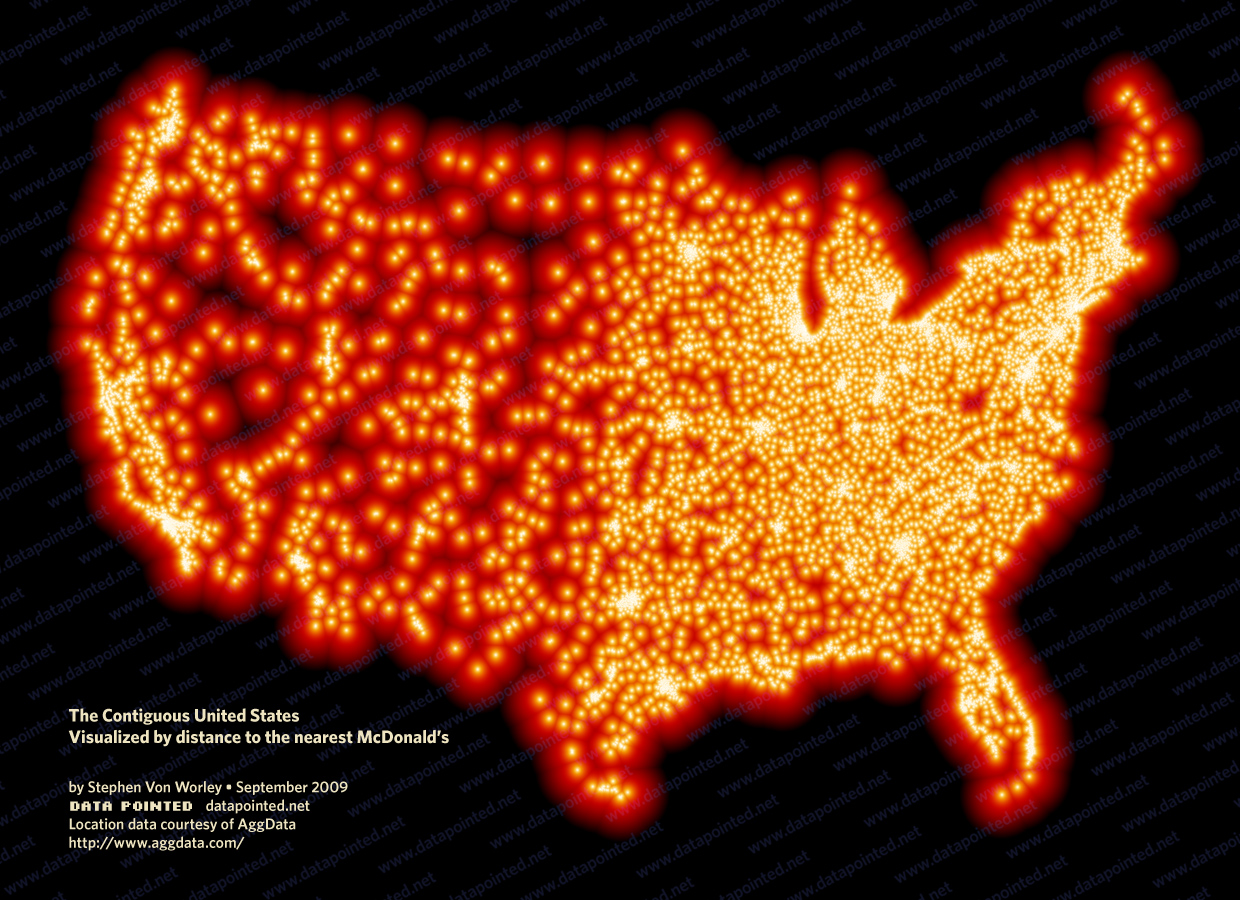
A couple of years ago, I put together a PowerPoint and webpage highlighting how topography is connected to many, many other things. I think it's quite striking how Idaho's Snake River Plain shows up on maps of nearly anything (like the distance to the nearest McDonald's in the map below). The connection of the shape of the land to so many other things is a also a good way to introduce the idea of Earth systems science. 


If I were back in the classroom, I'm not sure if I'd start with astronomy or the shape of the Earth, but it would likely be one of those two. Both of them provide good opportunity to really highlight the importance of understanding place and understanding how to map. In either case, I'd start with a focus on where we are. 

I'll also note that mapping is really a pretty big abstraction, and I was surprised by how many of my high schoolers didn't really know what a map was. A significant minority of my 10th graders couldn't locate Buffalo on an unlabeled map of New York (despite having lived there all their lives) or New York on an unlabeled map of US states. In a sense, that shouldn't be surprising, especially if you're working with kids who've not travelled much. Think about the conceptual leap of looking at a piece of paper and translating that into showing where you are on the surface of Earth! 

After realizing how many kids weren't able to place themselves on a map, I used Google Earth to recreate the classic Eames' film, Power of Ten centered on the school. (If you've not seen it, you need to click that link!). In the ReaL Earth Inquiry Project (an NSF funded program now in its final months) we put together tutorials for making your own Powers of Ten, centered on your school or a local landmark. Again, if I were back in the classroom, I'd show that in the first few days of school - for some kids in my class, you could almost see the light bulbs go on as they realized for the first time what a map really was, and recognized where in the world they were. Aspects of every unit play out outside your classroom door in some meaningful way, so grounding your students in where they are is something that you can connect to across the curriculum. 

Throughout the year, I'd also draw attention to big ideas that cut across the entire curriculum. This could be in the form of the Crosscutting Concepts and Science and Engineering Practices from the Next Generation Science Standards, or the set of Bigger Ideas we've been using in the ReaL Earth Inquiry Project. 


I'll also echo Glenn and Wendy's thoughts on coordinating across the team of teachers. You might consider having different teachers take leads on different topics, allowing for more development than individuals can give. Hopefully, that can help to give the curriculum a focus on what's local to the school. I know, of course, that that working well depends on who's on your team. 

Friday, August 23, 2013

Virtual Fieldwork & Ancient Denvers: A Teacher Professional Development Workshop Series at the Museum of the Earth

Last Updated: August 23, 2013

This fall, the Museum of the Earth at the Paleontological Research Institution (in cooperation with the Geological Society of America), will offer a series of professional development workshops on creating and using Virtual Fieldwork Experiences (VFEs). The workshop series will include live connection to the Geological Society of America's field trip to Colorado's Dinosaur Ridge and Red Rocks Park. In concert with trip leaders and participants, a VFE of Ancient Denvers will be developed for use in your classrooms.

The workshop series brings our popular Virtual Fieldwork and Teacher Friendly Guide professional development programming back to Central New York for the first time in many years!

The workshop series includes two face-to-face sessions and a final online session. The dates and times are:
  • Saturday, October 5, 2013 from 2:00 to 5:00 p.m. EDT, in Ithaca;
  • Sunday, October 27, 2013 from 1:00 to 4:00 p.m. EDT, in Ithaca;  and;
  • Either:
    • Wednesday, December 4, 2013 from 7:00 to 8:30 pm EST, online, or,
    • Saturday, December 7, 2013 from 10:30 am to noon EST, online,

Registrants should plan to attend all three sessions. The registration form is linked below and here. Registration is free but space is limited! Sign up today! 

Participants should bring their own laptop computers to the workshops. 


On Saturday, October 5, 2013 from 2:00 to 5:00 p.m., the first workshop will offer an introduction to VFEs, including approaches and resources for their use and how to make your own with your students. We will work with a draft of the Ancient Denvers VFE and develop suggestions for the most important and practical ways to extend it. We will also work examples from New York State and share tools, strategies and resources for participants to create their own.

The morning of the first workshop, from 9:00 a.m. to 1:00 p.m. on October 5, the Museum of the Earth will also host its annual Teacher Resource Day. 
  • Meet Museum of the Earth scientists and educators!
  • Take home free fossils, specimens, and publications.
  • See our new permanent exhibit on glaciers and our new coral tanks! 
  • Learn about museum exhibit design and get an advanced look at "Moving Carbon, Changing Earth," our upcoming exhibit on the carbon cycle, from the Museum of the Earth's Director of Exhibitions, Beth Stricker.
Register here for Teacher Resource Day or for both Teacher Resource Day and Virtual Fieldwork & Ancient Denvers! 

To register just for Virtual Fieldwork & Ancient Denvers, click here.

On Sunday, October 27,2013 from 1:00 to 4:00 p.m., participants will continue their work and also engage in live discussion with geologists and teachers in the field at Colorado's Dinosaur Ridge and Red Rocks Park. Participants in the actual field trip will be collecting data and taking pictures for inclusion in the Ancient Denvers VFE. Participants in the Virtual Fieldwork (those at the Museum of the Earth) will join via live interactive video at two field sites -- stromatolites in the Lykins Formation and dinosaur trackways in the Dakota Formation (shown in the first Gigapan below).

The field trip description, for those going on the actual field trip is here (scroll down to #418). It is also included at the end of this announcement.

In December, there will be two online sessions to share the updated Ancient Denvers VFE and to discuss its use, and the use of VFEs in teaching more broadly. Field trip participants will also participate in the calls. Participants should plan to attend one of the two final online sessions.

Participate in one or the other of the online wrap-up webinars:

  • Wednesday, December 4, 2013 from 7:00 to 8:30 pm EST, or,
  • Saturday, December 7, 2013 from 10:30 am to noon EST.

Here are a couple of high resolution images from the field sites:


See these Gigapans and more in A Google Earth file here. Additions will be made to Google Earth file before the first workshop, and we will add to it and create other resources for the VFE as the program progresses.

You will also want to download the Colorado and New York Google Earth geologic maps from the US Geological Survey's Digital geologic maps of the US states page.

Check back to this site for updates.

Instructors:

  • Don Duggan-Haas & Alexander Wall, PRI & its Museum of the Earth (in Ithaca and Colorado)
  • Sarah Miller, DCMO BOCES (in Ithaca)
  • Lon Abbott, University of Colorado (in Colorado)
  • Richard Kissel, Yale University Peabody Museum (in Colorado)

Instructional Technology Support:

  • Brian Gollands, PRI & its Museum of the Earth
  • Rene Carver, GST BOCES

Additional Support:

  • Justin Samuel, Geological Society of America (in Colorado)
  • Davida Buehler, Geological Society of America (in Colorado) 
  • And others will be added!

Field Trip Description:

418. Ancient Denvers: A Journey through the Front Range’s Geologic History. 
Sun., 27 Oct. US$88 (L, R).
Leader: Lon D. Abbott, University of Colorado
Cosponsor: GSA Geosciences Education Division
Show Leader Bio
On this trip, we will journey through the entire geologic history of Denver. Of necessity, the coverage of each chapter in that story is general. The trip is intended for convention attendees who seek a broad overview of the area’s geologic history, for their guests, and for K–12 teachers. We will start by viewing the evocative “Ancient Colorados” paintings at the Colorado Convention Center. From there we head to Red Rocks amphitheater to begin our conversation with the rocks that narrate the story depicted by the paintings. At the amphitheater, we will listen to rocky tales (via our observations of their characteristics) of Denver’s changing landscape between about 1700–250 million years ago. Next, we’ll journey to nearby Dinosaur Ridge, where the rocks pick up the story of Denver from the Jurassic to the middle Cretaceous. From there, we’ll travel to the Colorado School of Mines campus, where we can walk in the footsteps of latest Cretaceous dinosaurs. We will end our journey through time with trips to South Table Mountain and Green Mountain, whose rocks tell stories of the birth of the Rocky Mountains at the dawn of the Cenozoic era.

Register here.
To register for both Teacher Resource Day and Virtual Fieldwork & Ancient Denvers, use this form instead.  

Wednesday, July 24, 2013

Making a Zoomable Image Using Prezi

This post will show you how to convert a series of photos taken at different distances (or different zoom levels), compile them into a "zoomable image" in a small Prezi, (and maybe embed that into a Google Earth placemark).

What do I mean by "zoomable image?" Take a look:

Click "Start Prezi" and then the forward arrow to zoom in and you'll see what I mean.

How do you make a zoomable image in Prezi?

Note that a video is below the instructions that steps you through the process. 

Note that Internet Explorer makes this procedure more difficult than it is in Firefox, Chrome or Safari. Step 8 will not work in Internet Explorer, so use one of these other browsers.

The steps to create your zoomable image are:

  1. Take pictures of a feature from either multiple distances or using the zoom of your camera to give the same effect.
  2. Either download those pictures to your computer or upload them to the web.
  3. Go to prezi.com.
  4. Log in if you have an account or create one if you don't. Everything shown here can be done with the free account. If you are a teacher or student, be sure to sign up for the education account as it provides more features for free. 
  5. Create a blank Prezi -- I suggest not using a template for this kind of Prezi.
  6. Delete the title. We'll create our own later.
  7. Click on the "Insert" button at the top of the edit window. 
  8. Choose "Image."
    • If uploading from your computer, hit the "Select files..." button and upload your picture.
    • If using photos on the Internet, (from Picasa or Flickr, for example), 
      • go to the picture in a window or tab separate from your Prezi. Right-click (or control-click) on the picture to bring up a pop-menu. The pop-up menu includes an option to "Copy Image Address" or something similar. The exact wording is different in Firefox, Chrome and Safari, but they all include the option. 
      • Select that option to copy the image URL.
      • Return to your Prezi, still in edit mode, and paste in the URL in the Insert Image box.
  9. Zoom to the approximate area of your next picture.
  10. Repeat step 8 to insert the next image. 
  11. Align the second picture on top of the first:
    • To move the picture, click and drag on the hand in the picture's center. 
    • To resize, click and drag any corner.
    • To rotate, scroll to the corner and grab the round handle that sticks out from the corner. 
  12. Repeat with each image.
  13. To put in a path:
    • Click the pencil icon on the left side of the screen. 
    • Click on each picture in your series in the order you would like to zoom.
    • The pictures will appear along the left side, showing the order. You can click and drag to reorder. 
  14. Add a title by double clicking. If your pictures have a clear space, like sky, you may insert the title on top of the picture. In the example in the video, the title is above the picture. 
  15. In the past, it was possible to embed Prezis into Google Earth placemarks. At this writing, that feature is not working. When it did work, you simply copied the embed code from Prezi and pasted it into the placemark in Google Earth. 
Click the video to see the steps to create a zoomable image in Prezi. 


Monday, March 4, 2013

Creating Virtual Fieldwork Experiences as Professional Development

Updated March 31, 2014

This post is an overview of both how creating Virtual Fieldwork Experiences (VFEs) can serve as professional development and a brief resource guide for creating them. It's an update of materials created for conference workshops, and the entire text with illustrations can be downloaded as a pdf below. The entire post (excluding this introduction) may be downloaded as a pdf, or specific parts and associated resources may be downloaded separately.

The worksheets ask questions that can be asked of any site, though the Ecology Worksheet requires defining specific locations within the site for closer examination. They are Microsoft Word documents so that teachers may adapt to the specifics of their field sites and curriculum needs.


Thursday, December 20, 2012

Showing Change in a Place(mark): Easily Updatable, Embeddable Slideshows in Google Earth

Updated April 11, 2013: See note about forwarding to Google Plus below the video. 

You can not only easily embed a slideshow into a Google Earth placemark to show how a location has changed or is changing, you can very easily and quickly update the contents of the slideshow. And, if there is cell phone coverage at your field site, you can update your slideshow instantly from the field!

If you already are familiar with Picasa Web Albums, you can set up a slideshow and embed it in a Google Earth placemark in about three minutes. Here's a video on how to do that.


Picasa Web Albums are very similar to albums on other photo-sharing sites, and the same process should work for those albums as well.

In 2013, Picasa Web Albums began to automatically forward to Google Plus, where the embed codes (at this writing in April of 2013) are not easy to find. However, if you go to http://picasaweb.google.com/, you should be able to work with your Picasa Albums. You may need to select that option from a pop-up at the top of the screen if you are forwarded to Google Plus.

Note that you can decide whether or not you would like captions to show within the slideshow. In many cases, showing captions of the time and date of the image is a good idea. 

The placemark created in the video is available here in a Google Earth file that includes a few other examples.

Remember too, that anything with an embed code can be embedded into a Google Earth placemark. There's more about that idea in an earlier blog post: Google Earth Embeddables. That not only shows how to do it, but gives some other examples. Of course, if you figured out how to do it for a slideshow from watching the video above, you already know what to do!

Why would I want to embed slideshows?

There are a range of interesting possibilities for using embedding slideshows in a virtual fieldwork experience (VFE) or other Google Earth file. You can show, as the example in the video highlights, an ecosystem's response to fire or another kind of disturbance. You can show seasonal changes, or construction or restoration. We expect to use this to monitor changes in the deer exclosure at Cayuga Nature Center, and using our carcass cam (a trail camera currently focused on a deer carcass) to see what critters are dining on the carcass, and to see that carcass change over time. 

There's a long history of using repeat photography for environmental monitoring, and you can easily plug historic imagery into Picasa Web Albums.

How do I update from the field?

The Web Albums App allows you to upload pictures taken on your smartphone or tablet to Picasa Web Albums. There are other apps available as well. 

In the Web Albums App, you can create a new album, by clicking the + button and simply typing in a name and clicking "done." You can also add to existing albums, by clicking on the album name, and then the upward pointing arrow (the upload button) to upload. Once you click the upload button, you are given the choice of selecting from the photo library on your device, or using the camera. 

If you're adding to an existing album, you can use the images already there to help you frame your new picture. Ideally, pictures in the slideshow will be taken from the exact same vantage point and the exact same zoom level. Being able to view the existing pictures in the album on the device that you'll be taking the next picture on makes this relatively simple. Simply view a picture in the album that you wish to repeat and flip back and forth to the camera until you've aligned the camera. Then, take your picture and upload it. 

As soon as you've added that new picture to the album, someone viewing the placemark will see it instantly appear in the slideshow!

If something is out of order or missing...

If the slideshow plays pictures in the wrong sequence, then go to the album view in Picasa, click "Organize" just above the top of the album, and you will be able to click and drag them into the correct order. See the picture below. If the picture set has a stretch of missing images, you can either duplicate images, or insert slides that note what's missing. A simple way to make those slides is to use PowerPoint and export the slides as images. Then, add them into the Picasa Web Album in the appropriate place. You might do this with a photo from the album as background on the slide. 


Please share your examples!

Use the comments to share with others any example you've created. You'll need to post your file to the web in order to share. You can upload Google Earth files to Google Drive (formerly Google Docs). If you choose to share with Google Drive, be sure to share the file so that it's either public or that anyone with the link can access it. 

Don Duggan-Haas